How Employees Submit a Missing Punch in MyAttendanceManager Mobile (MAM Mobile)
Summary
This document outlines how employees can submit missing punch times for review in My Attendance Manager (MAM) mobile.
Submitting Missing Punches in MAM Mobile
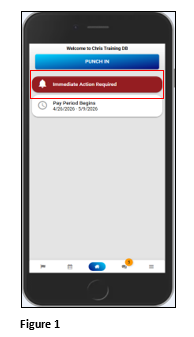
1. Once the employee logs into MAM Mobile, any missing punches during the current pay period and within the range of days defined by the organization will show as an Immediate Action Required notification on the home screen. Tap Immediate Action Required Figure 1).
Please note:
a). A missing punch is only recognized if there is an odd number of punches on the day in question.
b). The employee will only have one opportunity to submit their punch. If denied, there will not be an option to resubmit, and it will need to be manually fixed by a manager.
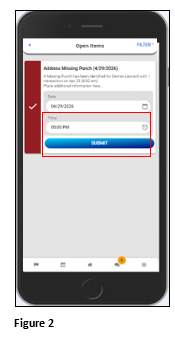
2. Enter the missing punch time and tap Submit (Figure 2).
3. The manager/supervisor will now have the opportunity to either approve or deny the time add. If the submission is denied, the missing punch will remain open.