How to Perform a Callback and Punch in MyAttendanceManager (MAM)
Summary
This document outlines how employees can use the callback and punch feature in MyAttendanceManager (MAM).
Employees can be asked to be available to work during a span of time when they are not scheduled for normal work. Available-to-work time is represented as a special type of shift in the employee’s schedule referred to as an ‘on call’ shift. If an on-call employee is asked to come to work while on call, their worked time is referred to as a callback shift. Callback time can be paid at a rate higher than the employee's normal rate and may also have a guaranteed minimum call-in shift length.
*Please note, this feature must be programmed to work.
Callback and Punch
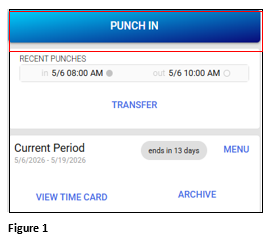
1. Once logged in to MyAttendanceManager, click Punch In (Figure 1).
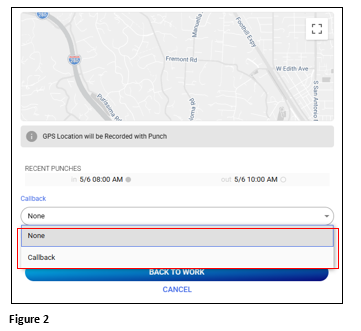
2. From the Callback dropdown, select the appropriate callback option (Figure 2). Please note, each organization will have their own options and rules.
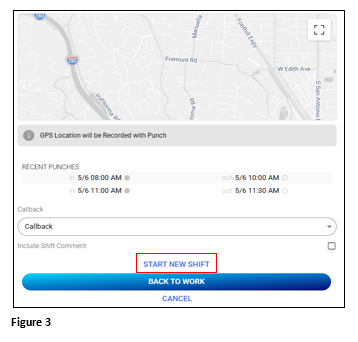
3. Click Start New Shift to enter the punch (Figure 3).
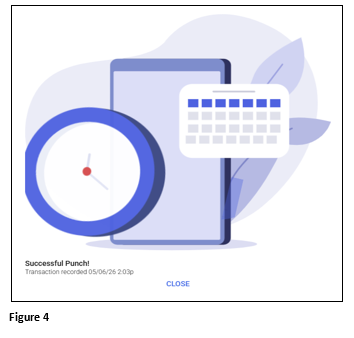
4. The employee should see a Successful Punch notification. When their shift is done, they will punch out as normal (Figure 4).
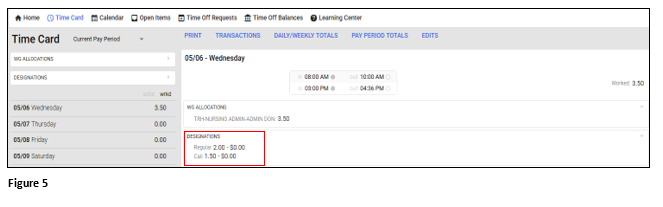
5. The employee can verify their callback hours/pay by reviewing their timecard (Figure 5).