How to Punch In and Out with tmsKiosk
Summary
This document outlines how employees punch in and out using tmsKiosk.
How to Punch In and Out
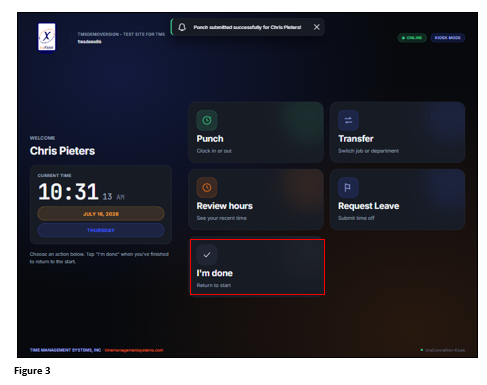
1. Enter the Employee ID/Badge using the keypad and tap Continue. If the ID contains letters, tap the ABC button above the keypad (Figure 1). Please note, the user’s ID/Badge may be displayed with ***** depending on the organization’s settings.
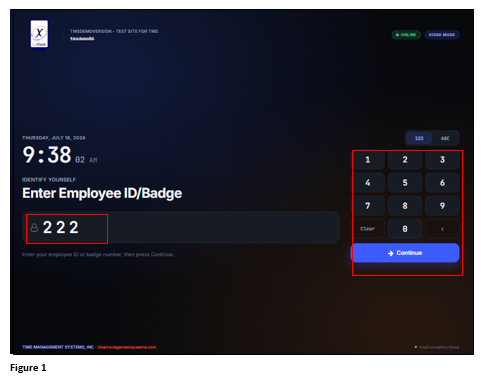
2. The Action screen will display with the employee’s name. Tap Punch and if successful, a message will display at the top. If the punch fails, a message stating that will display instead (Figure 2). Reasons for failure could be a duplicate punch or punch restrictions.
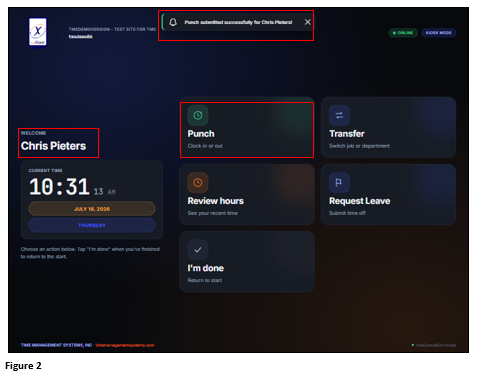
3. Tap I’m Done to exit. The Action screen will time out at 20 seconds if no other functions are selected (Figure 3).